




Vataga.terminal 5.14.1 Update
The Vataga.Terminal has been updated to version 5.14.1. The key innovations include the integration of funding rate data directly into the order book and quote table, the addition of the MEXC exchange in view-only mode, as well as new risk management tools and enhanced data visualization.
NEW FEATURES
Display of Funding Rate Information in the Order Book and Quote Table

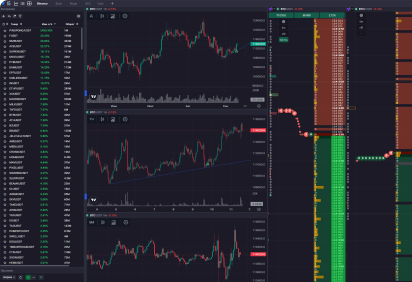
You can now display the exact funding rate level directly in the order book. It is possible to configure the funding value and the time until the next funding, which will determine how the information is displayed in the book. Additionally, a Funding column with a countdown timer has been added to the quote table, allowing you to filter data based on specific values.
MEXC Exchange Added in View-Only Mode
For the MEXC exchange, the terminal now supports viewing order books and charts, as well as adding instruments to the quote table. Order books in view-only mode are marked with a "View Mode" label.
Hotkey to Move Stop-Loss to Break-Even
This hotkey allows you to set a stop-loss to the break-even point or adjust an existing one while a position is open. The hotkey is named "Set SL to BE" (Set Stop-Loss to Break-Even).
Gradient Coloring of Clusters Based on Buy/Sell Delta
Gradient coloring of clusters based on the difference between buys and sells within a cluster is now available. To activate this setting, enable the "Delta Gradient" option in the general order book settings.
IMPROVEMENTS
Opening Instruments in Linked Spot-Futures Order Books
Now, when you select a futures (spot) instrument in one order book and there is no corresponding spot instrument on the same exchange, the corresponding spot (futures) instrument from another exchange will open in the linked spot (futures) order book. If there are no spot (futures) instruments on other exchanges either, the corresponding futures (spot) instrument from another exchange will open.
Closing Positions for Spot Instruments
If there are open orders in a spot instrument's order book that occupy the balance for that instrument, they will be automatically cancelled before the position is closed when using the close position function.
Adjusting Volume Fill Levels in the Order Book with the Mouse Wheel
When adjusting volume fill levels between 100k-500k (in USDT) using the mouse wheel, the step is now 50k.
Selection of Order Book Depth for Bybit Futures
The general order book settings for the Bybit exchange now include an option to select the display depth. Each depth level corresponds to a specific data update speed — the greater the depth, the lower the update speed. The combined depth mode merges depths of 200 and 1000 rows.
BUG FIXES
Fixed Terminal Crash on Startup for Windows OS
Fixed Bug with Focus Shifting in the Quote Table When Adding an Instrument During Listing
When a ticker is automatically added to the quote table (during a listing), the focus in the table will no longer jump to the new instrument.
Fixed Bug with the "Compress/Expand Order Book" Hotkeys
Fixed Bug with Volume Indicator Display on OKX Spot Charts
Fixed Bug with Switching PnL Display in the Position Info Panel in the Order Book
Update your terminal to version 5.14.1 to use the new features!



Latest News

- 19.06.2026
- Mary Wilson
- 21.05.2026
- Mary Wilson
- 07.05.2026
- Mary Wilson